
How to Set-up our Mobile App
Jump to

Shortcut
Download the “Ride with GPS” mobile app and enter shortcut
Download the mobile app for free via the iTunes app store or Google Play store.
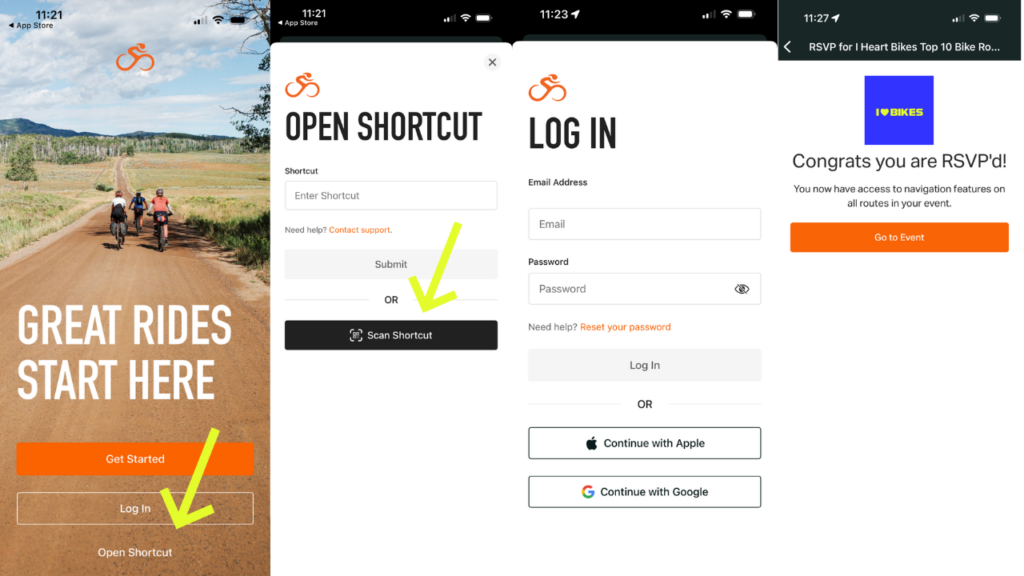
Open the App.
Tap Open Shortcut.
Please note there is no need to have a paid account to access our routes. If you are prompted for hit skip.
Select Scan Shortcut and scan the QR image.
You will redirected to login in to your account or create one if you don’t have one.
If you don’t have an account it’s best to select sign-in with Apple or Gmail.
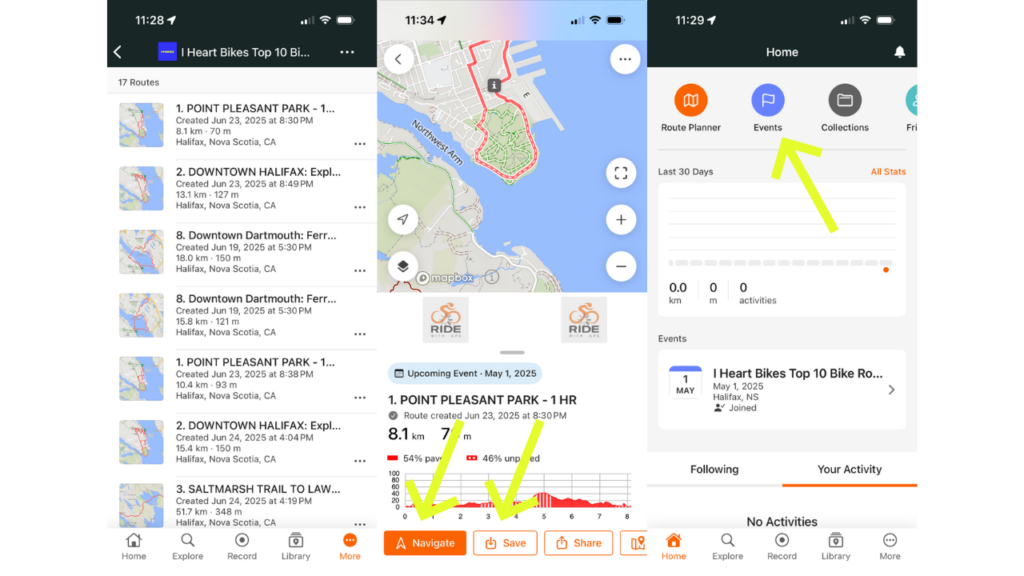
Once you are signed in you will be direct to the Events page which will now show you have RSVP’d to our Top 10 Routes in Halifax.
Select the route you are interested in and then select Save. Saving the route will make the content available 100% offline.
Hit Navigate to start the route!
I already have Ride with GPS, how do I access your routes?
If you already have the app installed and you are signed in, there is no need to sign out to access our routes.
From your home screen, tap More in the lower right.
Tap Open Shortcut from the menu
You can scan the QR image provided.
You will then become RSVP’d to our Top 10 Bike Routes in Halifax.
Finish Navigation
When finished riding and you want to end navigation, press and hold the pause button
Tap Finish Navigation
This will give you the options to view your activity.